

Apple SMS Verification
What to know before using a rented number with an Apple ID.
An Apple ID is the key to a lot of things: your device backups, purchases, photos, and messages. Apple uses a phone number for account security. It can text a code when you sign in, and it asks you to keep at least one trusted number on the account.
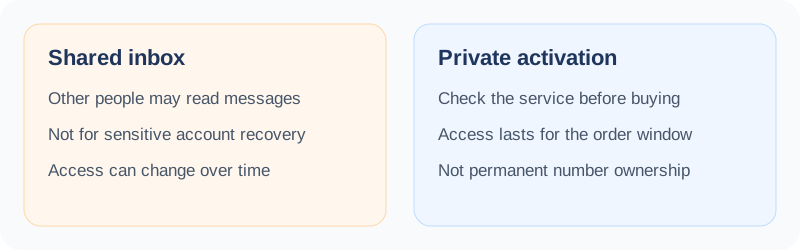
We want to be straight about this one. A rented number is temporary, and an Apple ID is not something you want to lose. This page explains when a rented number makes sense and when it does not. SMS Activate can rent you a number to receive a text code, and an activation that gets no SMS in 20 minutes is refunded to your wallet.
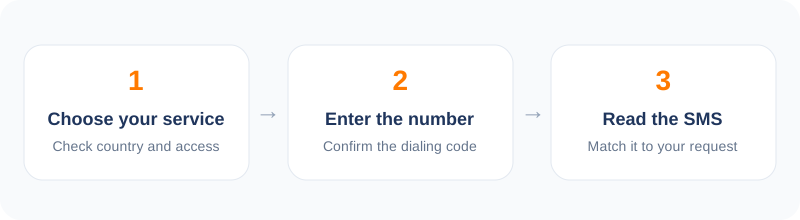
How to verify Apple in 5 steps
- 1Open the dashboard and choose Apple from the service list.
- 2Pick a country and buy a number.
- 3Enter the number where Apple asks for it.
- 4Request the code once and watch your dashboard.
- 5Enter the code and add a trusted number you will keep.
What Apple does with the number
Apple asks for a trusted phone number when you turn on two-factor sign-in. It sends a code there when you log in on a new device. If you lose access to your trusted devices, the number is one of the ways back in.
This makes the number a recovery tool. That is exactly why a temporary number is a poor fit for your main Apple ID. When the rental ends, you no longer control the place Apple sends your codes.
Where a rented number can make sense
Some uses are lower risk. A developer who tests sign-up flows, a person creating a throwaway ID for an app trial, or a family member who needs a short verification can use a rented number for a one-time text.
For anything you want to keep, use a number you will hold for years and add a second trusted number, such as a family member's. Review the trusted numbers in your Apple account settings after any change.
Apple can say no
Apple checks numbers closely. It may refuse a number it has seen too often, or ask you to wait before you try again. This is part of how it protects accounts, and it happens on its side.
We cannot promise that Apple will accept a rented number. Public guides say virtual numbers are hit and miss with Apple. If a number fails, cancel it after the first two minutes and try another country. Avoid repeated requests, because Apple can lock further attempts for a while.
Price and refunds
Numbers for Apple usually cost a bit more than for social apps, often between a few cents and a couple of dollars. Stock changes through the day. Your wallet is charged when a number is issued.
If no SMS arrives inside the 20-minute window, the charge is refunded to your wallet. Check the refund rules in your dashboard for your exact order type.
Frequently asked questions
Is it a good idea to use a rented number for my main Apple ID?
No. Apple uses the number for recovery, and a rented number will not stay yours. Use a number you will keep.
Why was my number refused?
Apple decides which numbers it accepts. Try another number or country, and wait a while between tries.
Do you sell Apple IDs?
No. We rent numbers for receiving a text code only.
What if the SMS never arrives?
The order is refunded to your wallet after the 20-minute window.
Other popular services
Related services
 Uber verificationReceive an Uber sign-in text without using your everyday number.
 PayPal verificationA careful guide to receiving a PayPal text code, and when not to.
 Snapchat verificationSign up for Snapchat with a number that is not your personal one.
 Tinder verificationVerify a Tinder login with a separate number and keep your own private.
 Steam verificationReceive a Steam text code without tying your main number to the account.
 Microsoft verificationReceive a Microsoft account text code, with the limits stated up front.