
Verification Code Not Received? 8 Common Causes and Fixes
Troubleshooting · October 16, 2026 · 6 min read
You tap send, wait, and nothing arrives. It is one of the most common small frustrations with apps and websites, and it usually has a boring cause. This guide lists eight of them in a sensible order, so you can fix the problem without guessing.
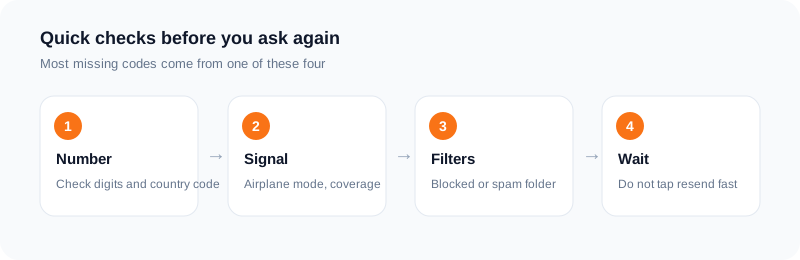
The order matters. Start with the quick checks on your side, then look at your phone and carrier, and only then think about the number itself.
1. A typo or the wrong country code
Check the number you typed, digit by digit. A single wrong digit sends the code to a stranger, and you will never see it. Also check the country code. Some apps guess it from your location, and the guess can be wrong, especially if you use a VPN or travel.
If the app shows the number back to you before sending, read it out loud once. This sounds silly, but it catches more mistakes than anything else on this list.
2. Asking for the code too many times
Many services limit how often they send a code to the same number. If you tap resend five times in a minute, the app may stop sending for a while, and the codes that do go out can arrive in a confusing order.
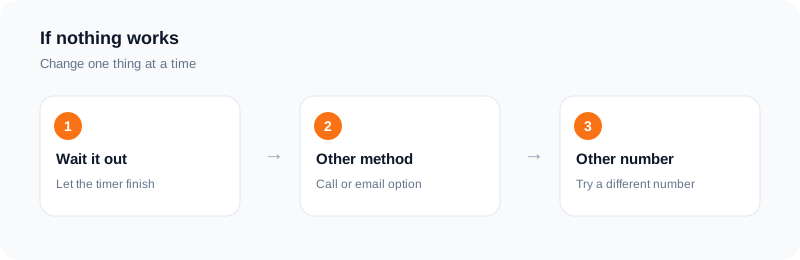
Request once, then wait for the timer in the app to run out before you try again. If the app shows a message about too many attempts, stop and come back later instead of retrying.
3. Weak signal, airplane mode, or Do Not Disturb
Texts need a working mobile connection. Check that airplane mode is off and that you have signal. If you rely on Wi-Fi calling, make sure it is set up, because some codes are blocked on Wi-Fi-only setups.
Do Not Disturb and focus modes can hide the notification even when the text has arrived. Open your messages app directly and look there.
4. A filter or blocked sender
Many phones sort unknown senders into a separate folder. Codes often come from short numbers or names, and a spam filter can move them out of sight. Look in any filtered, junk or unknown senders folder.
Also check that you have not blocked a number that the app uses to send codes. If you block one by accident, every future code from it will vanish.
5. Full storage or a messaging app problem
A phone with almost no free storage can fail to receive messages. If your messages app is old or acting strangely, restart the phone and try again. It is a small step that fixes more than it should.
6. Carrier delays and roaming
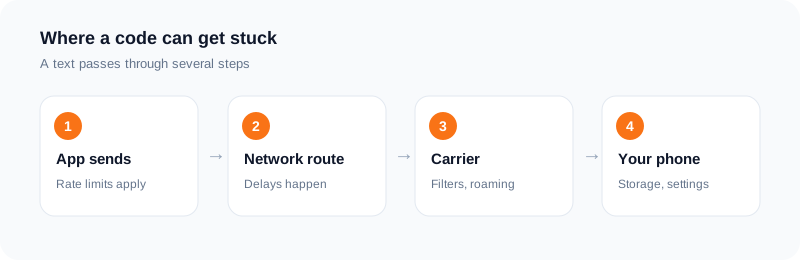
Carriers route codes through several systems, and delays do happen. If you are roaming, your carrier may block or slow messages from short numbers. Some prepaid plans or business lines also do not receive codes from certain senders.
If you suspect this, try the voice call option if the app offers it, or use another method such as email.
7. The service itself
Sometimes the problem is not you. A service can have an outage, or its text provider can be slow for one country. Check the service's status page or social account if it has one, and try again after a short wait.
8. A number the service will not accept
Some services refuse certain numbers. That includes landlines, some business lines, and numbers they see as temporary or used too often. The service decides this, and the rules can change.
If you use a rented number from a provider such as SMS Activate and no code comes, the order can be cancelled after two minutes and, for a standard activation, the charge is refunded to your wallet if no SMS arrives within 20 minutes. Then try a different number or country.
A fast checklist you can run in two minutes
Work from the cheapest check to the most involved. First, read the number on screen again, including the country code. Second, wait a full minute before pressing resend, because each request can push the next code back. Third, check that you have signal and that the phone is not in airplane mode or on silent filters.
Fourth, open your messages and look in folders such as "unknown senders" or "filtered", since some phones sort codes away from the main list. Fifth, restart the phone, which clears many small messaging glitches. Only after these five steps is it worth blaming the service or the number.
Keep notes of what you tried and when. If you contact support, the time of each request and the exact number you used make their job much easier.
What to tell support, and when to give up on a number
If the code still does not come, write to the service with three facts: the number in full, the time you asked for the code, and what the screen said. Avoid sending the same request ten times in the meantime. Repeated requests are a common reason a number gets limited.
If you are using a rented number and nothing arrives inside the activation window, do not keep pressing resend. For a standard activation the charge is refunded to your wallet when no SMS arrives, so the cheaper path is to let it end and try a different number or country.
If the same app rejects several different numbers, the cause is probably the app and not the numbers. Stop and try again later, rather than burning attempts.
Prevention for next time
Save yourself the trouble with a few habits. Turn off any call or message blocking that you do not need. Keep your phone software updated. Make sure the number on your account is current, and add a second way to recover the account, such as an email address.
For sign-ins you use often, an authenticator app avoids waiting for texts entirely. For one-time signups, request the code once, wait, and only then try again.
Cases that look the same but are not
Some failures feel identical from the user side. A code that never comes and a code that comes five minutes late both look like "nothing happened" for the first minute. Wait a sensible time before you decide which one you have.
A code that arrives but is rejected is a different problem. Check that you are typing the newest code, since older ones usually stop working when a new one is sent. Also check that you did not mix up a zero and the letter O, or add a space.
Codes by phone call instead of text have their own pitfalls. If the app offers a call option, keep the phone nearby and make sure unknown callers are not silenced.
Last, think about timing. Codes often expire after a short time. If you leave the screen to find your phone, you may need to ask again.
Frequently asked questions
How long should I wait for a code?
Wait for the timer in the app. Often that is one to two minutes. Do not tap resend repeatedly.
Why does the code arrive late?
Texts pass through the app, a network route and your carrier. A delay at any step can slow it down.
Can a spam filter hide the code?
Yes. Check any filtered or unknown senders folder in your messages app.
What if I use a rented number and nothing arrives?
Cancel after two minutes if you like, or wait. A standard activation with no SMS in 20 minutes is refunded to your wallet.
How long should I wait before asking for a new code?
A minute or two is a sensible minimum. Pressing resend repeatedly can delay delivery or trigger a limit.
Why do codes arrive on one phone and not another?
Signal, roaming, message filters and carrier settings differ between phones. Check each of these before assuming the number or the service is at fault.
Ready to try it?
Rent a number and receive your verification code in under a minute.
Open the dashboardKeep reading
Related services
 Telegram verificationCreate a Telegram account without exposing your personal phone number.
 WhatsApp verificationVerify WhatsApp with a private second number instead of your everyday SIM.
 Google / Gmail / YouTube verificationVerify a new Google account, Gmail address, or YouTube channel without your main number.