
Discord Phone Verification Not Working: What to Check
Troubleshooting · October 16, 2026 · 4 min read
Some Discord servers and some accounts ask you to verify a phone number. When the check fails, the error messages are short and not always clear. This guide explains the common causes and what to try.
We do not run Discord, so for anything about your account, Discord's own help pages are the final word. These are general checks that solve most cases.
The number is typed wrongly
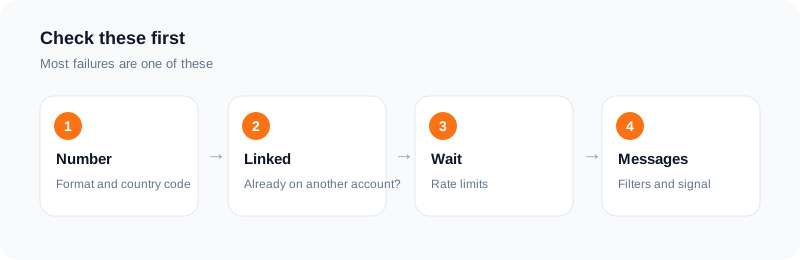
Check the digits and the country code. A wrong digit sends the code to someone else. If you copied the number from a note, make sure no extra spaces or characters came with it.
The number is already linked
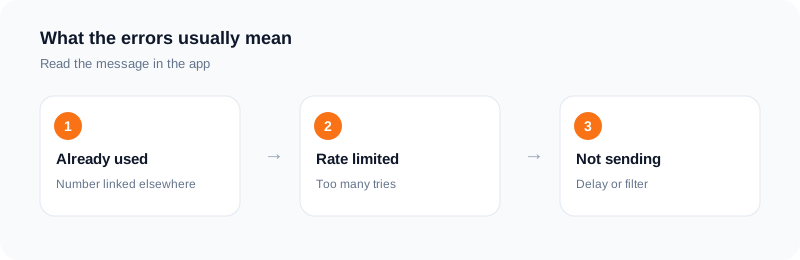
An error that says the number is already in use usually means it is linked to another account. A number can be linked to only one Discord account at a time. If it is your old account, you may be able to remove the number there first. Look at Discord's help pages for the current steps.
Too many attempts
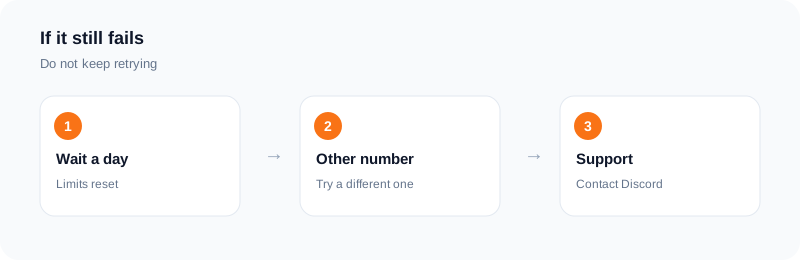
If you request the code several times, Discord can stop sending for a while and show a rate limit message. Stop retrying, wait, and then try once more. Repeated attempts make the wait longer.
The text is delayed or filtered
Codes can arrive late, or end up in a spam or unknown senders folder. Check there, check your signal, and turn off Do Not Disturb. If you are on a prepaid or business line, some senders may be blocked by the carrier.
Landlines and some number types
Discord may not accept some kinds of numbers, such as landlines or numbers it considers risky. The rules are Discord's and can change. If your number is refused, try a normal mobile number you own.
Using a rented number
Discord says VOIP, burner and landline numbers cannot be used for verification, so a rented number may well be refused. We cannot promise it will work. If the code does not arrive, a standard activation with no SMS in 20 minutes is refunded to your wallet, and you can cancel after two minutes to try another number.
Remember that a rented number is temporary. If the verification is tied to an account you care about, use a number you own.
Do not try to get around limits
If Discord has restricted an account or a number, repeated tries with new numbers will not help and can make things worse. Follow Discord's rules and contact their support.
A step-by-step way to find the cause
Start with the simple things. Read the number on screen and check the country code. Make sure the number is a mobile number and not a landline. Wait a full minute and look in your filtered messages.
Next, think about history. Has this number been used on another account? If so, the app may refuse it. Have you asked for several codes in a short time? If so, stop for a while, since extra attempts can lock you out for a period.
If those checks pass, try again later, from your usual network and device. A new device or a VPN can make a sign-in look unusual, so use the setup you normally use.
What to avoid
Do not try ten numbers in a row. Do not use tools that promise to bypass checks. They can lead to a ban and they put your account at risk.
If you are locked out of an account you own, use the official support form and give clear details. Be patient, as replies can take time.
If you use a rented number
Order only once you are ready to request the code. Watch the order page. If no SMS arrives, let the order end and the standard activation charge is refunded to your wallet, then try again later with a different number. Remember that the number is yours only for the activation, so add an email and a password to the account straight away.
How to avoid the problem next time
Use one account per number, and keep a note of which number you used. Make sure the number you give is a mobile number that you can reach. Do not request code after code in a few minutes.
Add an email and a strong password to the account as soon as it is created. If you set up on a new device later, have your details ready so that sign-in is quick and does not look unusual.
Frequently asked questions
Why does Discord say my number is already used?
It is probably linked to another account. Discord limits this.
Why is no code arriving?
Check the number, filters and signal, and do not tap resend repeatedly.
Will a rented number work?
It might not. Discord decides which numbers it accepts.
What if my rented number gets no SMS?
A standard activation with no SMS in 20 minutes is refunded to your wallet.
Why does the app say my number is already in use?
Another account may already be linked to it. Try a number that has not been used on that service.
Will a landline work?
Often not. These checks usually expect a mobile number that can receive text messages.
Ready to try it?
Rent a number and receive your verification code in under a minute.
Open the dashboardKeep reading
Related services
 Telegram verificationCreate a Telegram account without exposing your personal phone number.
 WhatsApp verificationVerify WhatsApp with a private second number instead of your everyday SIM.
 Google / Gmail / YouTube verificationVerify a new Google account, Gmail address, or YouTube channel without your main number.