

WhatsApp Verification with a Virtual Number
Verify WhatsApp with a private second number instead of your everyday SIM.
WhatsApp is the world's default messaging app, and every account starts with a phone number. That number is visible in group chats, tied to your business catalog if you run one, and synced with the address book of everyone you talk to. Freelancers, small business owners, and privacy-conscious users often need a WhatsApp presence that is not welded to their personal SIM card.
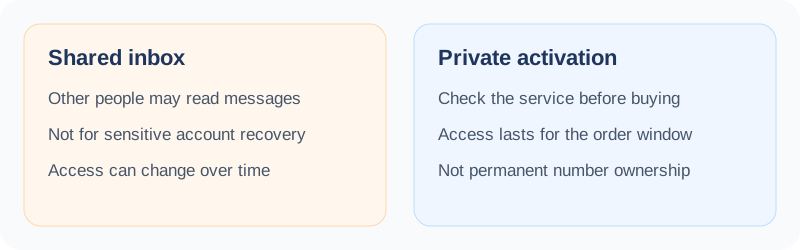
With SMS Activate you can buy a one-time activation number for a WhatsApp verification attempt. The activation lasts 20 minutes. Your wallet is charged when you buy it; eligible activations with no SMS are refunded under the activation rules. This is different from renting a number for a longer period. WhatsApp decides whether to accept the number. For an account you need to keep, use a number you continue to control.
Before you buy - three checks
- 1One code or more? An activation covers one code, for one verification. If this account will ask for codes again - logins, recovery, or security checks - do not rely on an activation number: use a number you will keep, or move the account to a number you control before the activation ends.
- 2Acceptance is decided by WhatsApp, not by SMS Activate. No page on this site can promise that a given number will be accepted.
- 3Choose on price or availability.
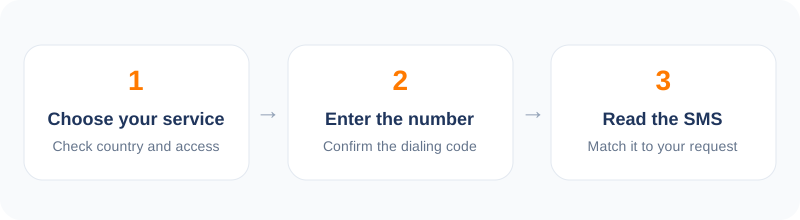
How to verify WhatsApp in 5 steps
- 1Open the dashboard and select WhatsApp from the service list.
- 2Choose a country, ideally matching where you or your customers are.
- 3Enter the activation number in WhatsApp's registration screen.
- 4Copy the code from your dashboard when it arrives.
- 5Finish setup: name, photo, and business profile if relevant.
How WhatsApp verification works
WhatsApp sends a code by SMS to the number you register. If the SMS does not arrive, the app offers a voice call that reads the code. For activation numbers, the SMS route is the standard path and the code shows up on your dashboard when it is sent.
Your wallet is charged when you place an activation order. On a standard one-time activation, if no SMS arrives within the 20-minute window the charge is refunded to your wallet; rentals, bulk and API Links orders follow their own rules. Availability can vary by country and service.
Legitimate reasons for a second WhatsApp number
Small businesses are the most common case. A shop owner who answers customers on WhatsApp all day does not want those conversations mixed with family chats, nor their personal number circulating in customer groups. A dedicated number keeps the business line clean and makes it easy to hand off to a colleague later.
Marketplace sellers are another group. Listing a phone number on classified sites is an invitation for spam; a second number absorbs that noise. And for people relocating or travelling, a number in the destination country makes local contacts far more comfortable reaching out.
Cost, delivery, and reliability
Prices for WhatsApp verification vary by country and operator, and the exact price is shown before you confirm. The code appears on your dashboard when the service sends it. If WhatsApp rejects a number before sending, pick a different country or operator and try again. If no SMS has arrived, you can request cancellation after the first 2 minutes, and eligible cancellations are refunded to your wallet.
After registration, keep in mind that WhatsApp occasionally re-verifies numbers, especially if you reinstall the app or switch phones. Since an activation number expires when its 20-minute window ends, set up your account fully (profile, settings, backups to your own email-linked storage) right away.
Tips for a smooth WhatsApp activation
Use the official WhatsApp or WhatsApp Business app, enter the number in international format, and request the code once. Wait for the SMS before trying the voice-call option. Then complete your profile - a photo and a name - and secure the account with two-step verification.
Keep the account after the number expires
An activation number is time-limited. Once its 20-minute window ends, you cannot receive another code on it. For an account you need to keep, move it to a number you control while you still have access, and use any other recovery option WhatsApp offers. If the account matters for money, orders, or a business, use a number you will keep.
Frequently asked questions
WhatsApp said the number is invalid. What now?
Some numbers are pre-screened by WhatsApp. If no SMS arrives, you can cancel an activation after two minutes or wait for the activation window to expire for a wallet refund. Then try another number or country.
Can I use this for WhatsApp Business?
Yes, the verification flow is the same. Register through the WhatsApp Business app and complete your business profile afterwards.
What if the SMS never arrives?
The order expires automatically and the charge is refunded to your wallet under the activation refund rules. Retry with a fresh number.
Other popular services
Related services
 Google / Gmail / YouTube verificationVerify a new Google account, Gmail address, or YouTube channel without your main number.
 OpenAI / ChatGPT verificationIf OpenAI asks for phone verification, keep your personal number out of it.
 Facebook verificationRegister or verify a Facebook account while keeping your personal number private.
 Instagram verificationSet up an Instagram account with a number that is not your personal line.
 TikTok verificationCreate a TikTok account with a second number and keep your main line private.
 Discord verificationVerify a Discord account without attaching your everyday phone number.