
Telegram Without Your Personal Number: Safe Options Explained
Privacy · October 16, 2026 · 4 min read
Telegram asks for a phone number when you sign up. That number is your account key, and by default people who have it saved can see you on the app. Many people want to use Telegram without sharing their personal number.
There are two separate things to look at: who can see your number inside Telegram, and which number you use to register.
Hide the number inside Telegram
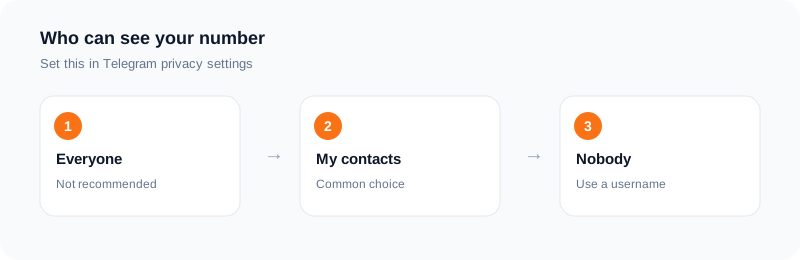
You do not have to show your number to other users. In Telegram's privacy settings, you can choose who can see your phone number and who can find you by it. You can limit it to your contacts or to nobody. Check the current menu names in your app, since they can change.
You can also set a public username. People can then find you by the username, so you never have to share the number.
Choose the number you register with
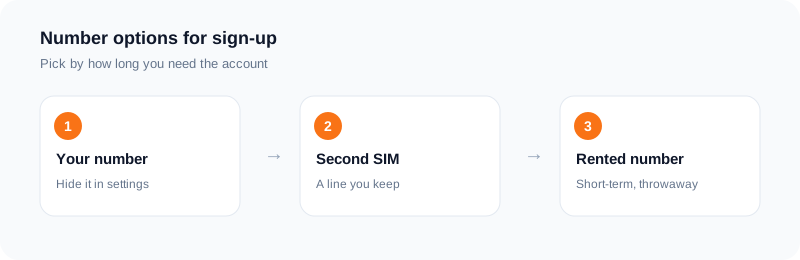
The number you register with still matters for recovery. If you lose your phone or log out, Telegram sends a code to that number. So the best choice for an account you want to keep is a number you will own for a long time, such as a second SIM or eSIM.
For a throwaway or test account, a rented number can receive the first code. The limit is that the number is temporary, and later codes will not reach you.
Where a rented number fits
With SMS Activate you choose Telegram and a country, and the number appears on your dashboard. When Telegram sends the code, it shows up there. If you plan to keep the account, set a two-step verification password and add a recovery email right away, so you are not locked out when the number is gone.
If no SMS arrives inside 20 minutes, a standard activation is refunded to your wallet. Telegram decides which numbers it accepts, so we cannot promise every number will work.
Other safety settings
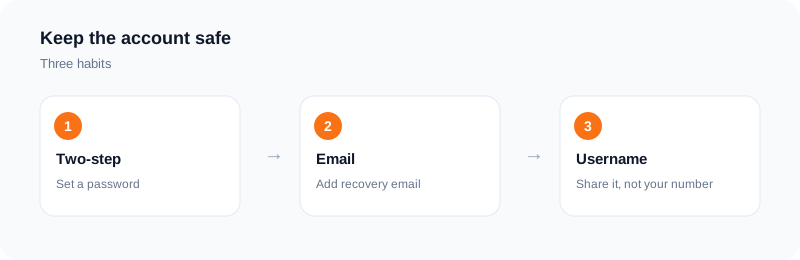
Turn on two-step verification with a password you will remember. Review which devices are logged in, and end sessions you do not know. Be careful with links from strangers and never share your login code with anyone, even someone who says they are from Telegram.
What not to do
Do not use extra accounts to spam or to get around a ban. That breaks Telegram's rules, and we do not support it.
A privacy walkthrough for a new account
Menu names change, so look for the current labels in your app. The general order is the same. Open the privacy settings. Find who can see your phone number and set it to nobody. Note that people who already have your number saved in their contacts can still see it on Telegram. Find who can find you by number and limit that too.
Then set a username, so people can reach you without your number. Check who can add you to groups and who can see your last seen time. Review the list of active sessions and end any that you do not recognise.
Finally, add a second step to your sign-in with a password, so that a stolen code alone is not enough.
Keeping the account usable over time
An account tied to a number you cannot keep is fragile. If the number goes away, a sign-in on a new device may become impossible. For an account you care about, register with a number you keep and hide it in the settings.
If you only want a throwaway account to look around a channel, a rented number is enough, as long as you accept that the account may not be recoverable.
Groups and channels
Before you join public groups, check what is visible on your profile. Members may see your username and photo. Think about whether you want both to be public. Use a different name from your other accounts if you wish to stay apart.
A short checklist for a private account
Number visibility set to nobody. Search by number limited. A username set. Two-step sign-in with a password turned on. Active sessions reviewed. Group invites limited to people you know. Profile photo and name checked from another account.
Review the list every few months. Settings can change after app updates, so a quick look keeps your choices in place.
Frequently asked questions
Can people see my number on Telegram?
It depends on your privacy settings. You can limit it to contacts or to nobody.
Can I use a username instead?
Yes. A public username lets people find you without your number.
Will a rented number keep working?
No. It is for the first code. Add two-step verification and a recovery email.
What if no code arrives?
A standard activation with no SMS in 20 minutes is refunded to your wallet.
Can people see my number if I join a group?
That depends on your privacy settings. Set the phone number visibility to nobody, then check how your profile looks to others.
Can I use a rented number for a long-term account?
It is risky. If you cannot receive messages on that number later, you may be unable to sign in on a new device.
Ready to try it?
Rent a number and receive your verification code in under a minute.
Open the dashboardKeep reading
Related services
 Telegram verificationCreate a Telegram account without exposing your personal phone number.
 WhatsApp verificationVerify WhatsApp with a private second number instead of your everyday SIM.
 Google / Gmail / YouTube verificationVerify a new Google account, Gmail address, or YouTube channel without your main number.