
How to Safeguard Your Personal Number in 2026
Privacy · By SMS Activate Team · March 10, 2026 · 6 min read
Every app, newsletter and loyalty program asks for your phone number. Each time you hand over the number tied to your bank, your family chats and your two-factor codes, you add one more company that can lose it, share it or use it to build a profile of you.
This guide explains where a number tends to end up, what a second number can and cannot do, and a simple routine that keeps your main number for the people who need it.
Why one number is a weak point
Your number does more than ring. Banks use it for codes, messaging apps use it as your account name, and delivery services use it to reach you. When one number does all of that, anyone who gets hold of it has a useful starting point.
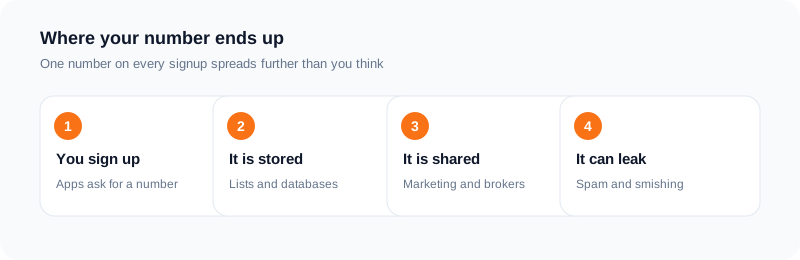
Numbers leak in ordinary ways: a company is breached, a marketing list is sold on, a classified ad is scraped. Data brokers then match a number against a name and an email address. The usual result is spam calls and fake delivery texts. In worse cases it is an attempt to take over a phone line, which is why a number that appears in many databases deserves care.
Once a number is in those lists there is no reliable way to pull it back out. The better habit is to give out fewer copies in the first place.
Compartmentalize: two lanes for your number
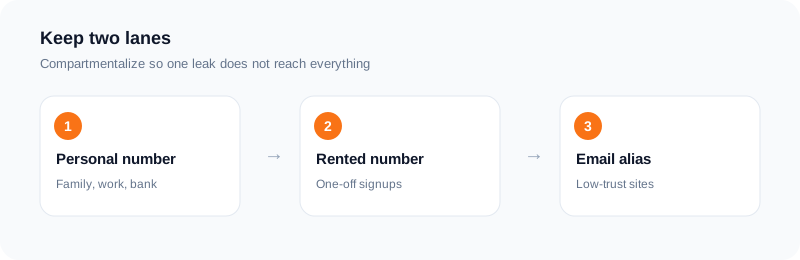
Think of two lanes. Lane one is your personal number. It goes to family, work and your bank, and nobody else. Lane two is a temporary number for everything else: a trial account, a shop you may never use again, a one-off verification.
When you rent a number for a single verification, the app gets a working contact point and you get your account. Your real number never enters that company's records. If that company is later breached, your personal number is not in the leak.
Pair this with an email alias for low-trust signups. A number and an email that are both separate make it much harder to link your accounts together.
Decide which lane an account belongs in before you sign up, not after. If losing the number would mean losing the account, it does not belong in the temporary lane.
| Lane | What goes here | Number to use |
|---|---|---|
| Personal lane | Bank, mobile carrier, doctor, employer, close family and friends, any account you could not recover without a phone call | Your own SIM |
| Kept lane | Social or work accounts you care about | A number you hold long-term, plus a recovery email and an authenticator app where offered |
| Temporary lane | Free trials, coupon sites, one-time marketplace signups, surveys, test accounts you can recreate | A private activation for the code only |
How it works with SMS Activate
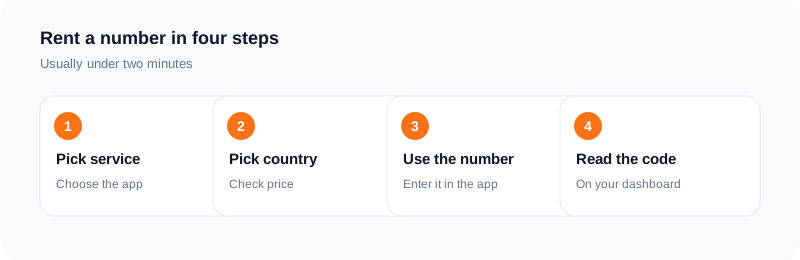
The process is short. Pick the service you want to verify, choose a country, and place the order. Your wallet is charged when the number is issued. The number appears on your dashboard, and the code shows up there when the app sends it.
If no SMS arrives inside the 20-minute activation window, the charge is refunded to your wallet. You can also cancel after the first two minutes if nothing has come in. Rental, email and API Link orders have their own rules, so check them before you buy.
What a second number does not do
Be realistic. A rented number is yours only for the activation, so it is a poor choice for an account you need to recover later, such as a bank or a payment account. For those, use a number you will keep.
Some services also refuse numbers they see as temporary. That decision is theirs, and it can change. If a number is refused, cancel the order and try another one. Always follow the rules of the service you are signing up for.
A short routine to keep
Give your personal number only to people and services that truly need it. Use a rented number for one-off signups. Add a recovery email to any account you want to keep, so you are never locked out when a number is gone.
Review which apps can see your real contact details once in a while, and remove the ones you no longer use. Your phone number works like an identity key. Treat it that way.
A quick audit of where your number already is
Before you change habits, look at what you already have out there. Open the privacy or account page of your email, your main shopping accounts, your delivery apps and your loyalty cards, and note which ones hold your main number. You will probably find more than you expected, including accounts you stopped using years ago.
For each one, ask a plain question: does this company need to reach me by phone? A bank does. A store you visited once does not. Where the number is optional, remove it or replace it. Where an account is dead, delete the account instead of just leaving it. A number that is not stored cannot leak.
Do this once, then repeat it twice a year. It takes less time than most people expect, and it shows you which companies deserve the personal lane and which belong in the temporary one.
Examples of what goes in each lane
Lane one (your personal number): your bank, your mobile carrier, your doctor, your employer, close family and friends, and any account that you could not recover without a phone call. These are services where losing access would cause real trouble, so they should reach a number you control for the long term.
Lane two (a temporary number): a free trial that asks for a code, a coupon site, a one-time marketplace signup, a survey, a download that wants "verification", or a test account you are setting up to look around. If you would not mind losing the account tomorrow, it belongs here.
A middle group exists too. Social accounts you care about are better tied to a number you keep, because a rented number is yours only for the activation. If you lose the number, you may lose the way to recover the account. Decide before you sign up, not after.
What to do if your number is already in a leak
If you get a notice that a company lost your data, do not panic, but do not ignore it either. Change the password on that account and on any account that shares it. Turn on two-factor sign-in with an authenticator app where the service offers it, because codes sent by text are the weakest form of the second step.
Be careful with calls and texts that mention the breach. Scammers often use news of a leak as a reason to contact you. If a message asks you to click a link or read out a code, contact the company through the app or website you already use, not through the message.
If you notice your phone suddenly losing service, call your carrier from another phone and ask about any recent SIM or port requests. Phone companies commonly let you set a PIN or password on your account. Ask yours whether it offers extra protection against number transfers.
If your phone suddenly loses service, call your carrier from another phone using its official number and ask about recent SIM or port requests and about a PIN or password on your account. Carrier steps differ, so use the carrier's official channel only - never a number sent to you in a message.
Frequently asked questions
Is it better to use a second number than my own?
For one-off signups, yes, because your own number stays out of that company's records. For accounts you must recover later, use a number you will keep.
What happens if no code arrives?
If no SMS arrives within the 20-minute activation window, the charge is refunded to your wallet.
Can I cancel an order?
You can cancel an active activation after two minutes if no SMS has arrived. Other order types have their own rules.
Will every app accept a rented number?
Not always. Each service decides which numbers it accepts. If one is refused, try another number or country.
Should I give my real number to every site that asks?
No. Give it to services where you need phone recovery or a real call, such as your bank. For optional signups, use a separate number or skip the field when it is not required.
Is a rented number a replacement for two-factor authentication?
No. A rented number helps you keep your main number out of marketing lists. For accounts that matter, use an authenticator app or a security key where available.
Ready to try it?
Open the dashboard to see the price for your service and country before you order.
Open the dashboardKeep reading
Related services
 Telegram verificationCreate a Telegram account without exposing your personal phone number.
 WhatsApp verificationVerify WhatsApp with a private second number instead of your everyday SIM.
 Google / Gmail / YouTube verificationVerify a new Google account, Gmail address, or YouTube channel without your main number.