How Long Does a Temporary Phone Number Last? Activation vs Rental Explained
Guides · By SMS Activate Team · November 6, 2026 · 11 min read
A temporary phone number from SMS Activate lasts 20 minutes when you buy a one-time activation. Longer access is available through rental, and exact durations are shown in the dashboard.
That short answer covers the choice most readers need to make, but the detail matters. A 20-minute window can be plenty for one sign-up, and it can be the wrong choice if you will need the same number again later. This guide explains how the 20 minutes work, how rental is different, what happens if a code does not arrive, and how to decide before you place an order.
What "temporary" means here
A temporary number is a number you use for a short period, for a specific job, instead of using your personal number. On SMS Activate, the word temporary does not mean the same thing for every order type.
A one-time activation is built around one job: receiving verification codes for a selected application within a short window. A rental is built around longer access. Email verification and API Link orders follow their own rules, shown in the dashboard.
That is why the first step is not to ask how long a temporary number lasts in general. The first step is to ask which type of order you are buying, and what you need it to do. If you only need to finish one verification, the answer is simple. If you need to come back to the same account later, you need to look at the other option before you pay.
You can see the current options on the services page, and you can read the common questions on the FAQ page before you choose.
How long does a one-time activation last?
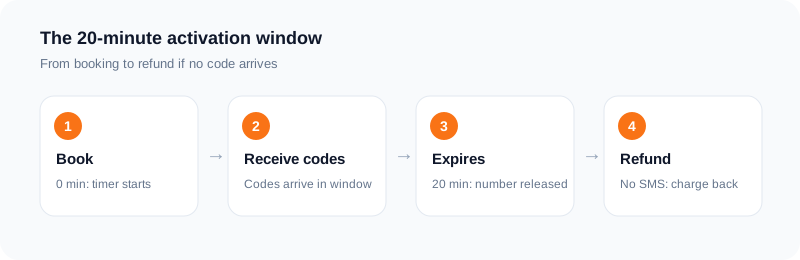
A one-time activation lasts 20 minutes from the time of booking.
The clock starts when you book the number, not when you first use it, and not when the first code arrives. That timing matters for planning. If you book a number and then spend time looking for the right page in an app, or filling in a long form, that time is part of the 20 minutes.
A practical way to think about it is to have the sign-up page open and ready before you book. Know which application you are verifying, know which country you need, and be ready to request the code as soon as the number is active. That does not change the length of the window, but it does help you use the window for the job itself, rather than for preparation.
If the 20 minutes pass, the activation ends. At that point, you would need to place a new order if you still need a number, and you would need to check the price and the rules in the dashboard again before you confirm it.
What you can do during the 20 minutes
During this window, the user can request and receive multiple verification codes for the selected application.
That point is easy to miss. A one-time activation does not mean one code and then the number stops working. It means one activation, for one selected application, for 20 minutes. If the first code does not work, or if the app asks you to request a new code while you are still inside the window, you can request another code for that same application.
This is useful when a code arrives late, when you enter a code incorrectly, or when an app asks for a second code during the same sign-up step. It does not change the end of the window. The extra codes still need to arrive and be used inside the 20 minutes.
It also does not mean you can use the same activation for a different application. The activation is for the application you selected when you placed the order. If you need a number for a different application, that is a different order, with its own price and its own 20-minute window.
What happens to the charge?
The wallet is charged when the order is placed.
That is the point at which the money leaves your wallet balance for that order. You should check your wallet balance and the final price in the dashboard before you confirm, because the charge happens at the time of the order, not after a code arrives.
If a code does not arrive, there are two separate points to know.
First, the user can cancel an eligible activation after the first 2 minutes if no SMS has arrived and the 20-minute window has not ended. The two conditions matter together: you need to wait until after the first 2 minutes, you need to have received no SMS, and the 20-minute window needs to still be open. If a code has already arrived, that cancellation route does not apply in the same way.
Second, if no SMS arrives within the 20-minute window, the activation charge is refunded to the wallet. That refund is tied to the activation and to the window ending with no SMS received. It is not a promise about how fast a code will arrive, and it is not a promise that a particular app will accept a number. It is a rule about what happens to the charge when no SMS arrives in the time allowed.
Rental, email verification and API Link orders follow their own rules, shown in the dashboard. Rental refunds are checked manually. Do not assume that the activation refund rule applies in the same way to a rental, an email verification order, or an API Link order. Check the rules for that order type in the dashboard before you place it.
Activation vs rental: what is different?
The main difference is time, and what that time is for.
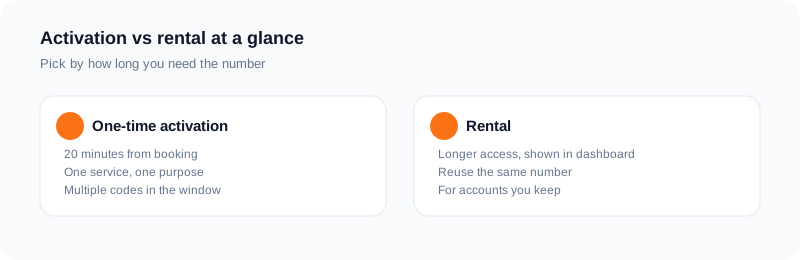
An activation gives you 20 minutes from booking to receive codes for a selected application. A rental gives you longer access, and exact durations are shown in the dashboard.
The table is a guide, not a substitute for the dashboard. The dashboard shows the final price and the rules for the order type you have selected, before you confirm it. If the dashboard and a general guide disagree, the dashboard is the place to check.
| Point | One-time activation | Rental |
|---|---|---|
| Length | 20 minutes from the time of booking | Exact durations are shown in the dashboard |
| Codes | Multiple verification codes for the selected application during the window | Rules are shown in the dashboard |
| Charge | Wallet is charged when the order is placed | Rules are shown in the dashboard |
| If no SMS arrives | If no SMS arrives within the 20-minute window, the activation charge is refunded to the wallet. An eligible activation can also be cancelled after the first 2 minutes if no SMS has arrived and the window has not ended. | Rental refunds are checked manually |
| Best for | A verification you can finish inside 20 minutes | Needing longer access than a 20-minute activation gives |
When 20 minutes is enough
Twenty minutes is enough when the whole job fits inside one short session.
That usually means a single sign-up or a single verification step, where you are ready to start, you know the application, and you can request the code straight away. If the app sends the code quickly and you can enter it in the same session, the activation has done its job.
It also helps if you do not need the number again after that step. If the account is set up, the code has been entered, and there is no later step that will ask for a code on the same number, a one-time activation is a reasonable fit.
Before you book, ask yourself three plain questions:
Can I finish this verification now, in one session? Am I ready to request the code as soon as the number is active? Will I need this same number again after the 20 minutes end?
If the answer to the first two is yes, and the answer to the third is no, a 20-minute activation is likely to be enough. If the answer to the third is yes, or if you are not sure, read the next section before you place the order.
When you should choose a rental instead
You should choose a rental instead when you need longer access than a 20-minute activation gives.
That is the clearest way to put it. Rental exists for the cases where 20 minutes is not the right length. If an account may ask for a code again after the first sign-up, if a later login step may need the same number, or if you need to keep access open for a longer period, a one-time activation will end before that later step happens.
In that case, placing another activation later is not the same as having longer access. A new activation is a new order, with a new 20-minute window, and its own price shown in the dashboard before you confirm it. If you need access that lasts beyond that window, look at rental first.
Exact durations are shown in the dashboard. That is where you should check how long a rental lasts for the country and application you need, what it costs, and what its own rules are. Do not plan around a length you have read elsewhere. Check the rental options in the dashboard for the order you are about to place, and confirm the price before you pay.
Rental refunds are checked manually, which is different from the activation rule described above. That is another reason to read the rental rules in the dashboard before you order, rather than assuming the same refund timing applies.
What about the free numbers?
SMS Activate also has a free public demo inbox with shared numbers.
The free numbers page is a way to see how receiving SMS online works, without placing a paid order. You can find it on the free numbers page. It is a demo, and it works in a different way from a paid activation or a rental.
Anyone can read messages in a shared inbox, so it is unsuitable for important accounts. That is the key point to understand before you use it. A shared inbox is not private. If a message contains a code for an account that matters to you, other people can see that same inbox. Do not use a shared public number for an account you need to keep safe, for an account with money or personal information attached to it, or for any account where someone else seeing a code would be a problem.
Use the free demo to learn how the inbox looks and how messages arrive. Use a paid activation or a rental, with the rules described above, when the account matters and you need a number for your own order.
How pricing works before you confirm
Prices vary by app, country and current tier. The final price is shown in the dashboard before confirming an order. Prices are in US dollars.
That means there is no single price for a temporary number. The price can change with the application you select, the country you select, and the current tier for that combination. You should not plan around a price you saw for a different app, a different country, or a different time.
You can get a general view on the pricing page, but the price that matters is the one shown in the dashboard for your exact order, before you confirm it. Check the application, the country, and the price together on that screen. If any of those three are wrong, change them before you confirm, because the wallet is charged when the order is placed.
The same check applies to rental. The dashboard shows the price and the exact durations for the rental you have selected. Use that screen as the source for the cost and the length, not a price list from another page or another order.
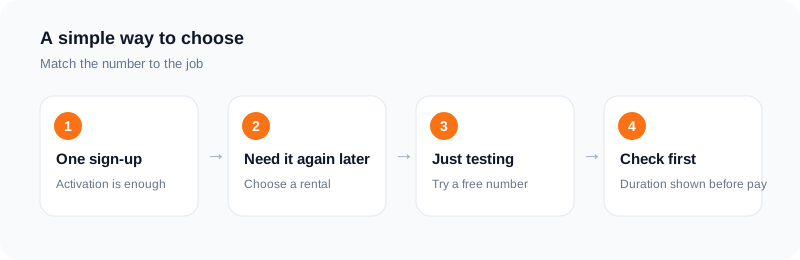
A simple way to choose
If you want a short checklist to use before you order, use this one:
Decide whether you need 20 minutes or longer access. If you need longer access, look at rental, and exact durations are shown in the dashboard. Decide which application the number is for. A one-time activation is for the selected application. Decide which country you need, and check it in the dashboard. Check the final price in the dashboard before you confirm. Prices vary by app, country and current tier, and prices are in US dollars. Have the sign-up page ready, so you can request the code inside the 20-minute window if you choose an activation. Do not use the free public demo inbox for an important account, because anyone can read messages in a shared inbox.
If you are still unsure between an activation and a rental, the question to return to is time. Can the job be finished in 20 minutes from booking, with no later need for the same number? If yes, an activation fits. If no, or if you are not sure, check the rental options in the dashboard before you pay.
This article does not promise that any app will accept a temporary number. It explains how long the number lasts, what happens if no code arrives, and how to check the price and rules for your own order before you confirm it.
Frequently asked questions
How long does a temporary phone number last?
A temporary phone number from SMS Activate lasts 20 minutes when you buy a one-time activation. That 20 minutes starts from the time of booking. Longer access is available through rental, and exact durations are shown in the dashboard.
Can I keep a temporary number?
A one-time activation does not give you longer access beyond its 20-minute window. If you need longer access, look at rental. Exact durations are shown in the dashboard, and you should check the rental rules and price there before you place an order.
What happens if my code does not arrive?
For a one-time activation, the wallet is charged when the order is placed. You can cancel an eligible activation after the first 2 minutes if no SMS has arrived and the 20-minute window has not ended. If no SMS arrives within the 20-minute window, the activation charge is refunded to the wallet. Rental, email verification and API Link orders follow their own rules, shown in the dashboard. Rental refunds are checked manually, so do not assume the activation rule applies to them.
Can I receive more than one code?
Yes, during a one-time activation. During the 20-minute window, you can request and receive multiple verification codes for the selected application. The codes still need to be requested and used inside that window, and the activation is for the application you selected.
When should I choose a rental instead?
You should choose a rental instead when you need longer access than a 20-minute activation gives. If you may need the number again after the first verification, or if the job cannot be finished inside 20 minutes from booking, check the rental options in the dashboard. Exact durations are shown in the dashboard.
Is the free inbox private?
No. SMS Activate also has a free public demo inbox with shared numbers, and anyone can read messages in a shared inbox. That makes it unsuitable for important accounts. Use it as a demo, and use a paid activation or rental when the account matters.
Ready to try it?
Open the dashboard to see the price for your service and country before you order.
Open the dashboardKeep reading
Related services
 Telegram verificationCreate a Telegram account without exposing your personal phone number.
 WhatsApp verificationVerify WhatsApp with a private second number instead of your everyday SIM.
 Google / Gmail / YouTube verificationVerify a new Google account, Gmail address, or YouTube channel without your main number.