How Do You Handle Phone Verification in Pakistan?
Guides · By SMS Activate Team · Draft - not yet published · 6 min read
Phone verification in Pakistan works the same way it works anywhere else: the service sends a code to a phone number, and you type the code back to prove the number is yours. The hard part is not the code. It is deciding which number to give.
Most people in Pakistan have one personal number, and they do not want it attached to every account they create. A personal +92 number tied to ten different sign-ups means ten different places that can message you, share your number, or lock you out when the number changes. This guide covers the realistic options, the privacy trade-offs, and how payment works when international cards are awkward.
Which services ask for phone verification?
Almost every service you sign up for now asks for a phone number at some point. The common ones:
Messaging apps such as WhatsApp and Telegram, which use the number as your account identity. Social platforms such as Facebook, Instagram, and TikTok, which ask for a number at sign-up or when you turn on extra security. Email and accounts such as Google, which may ask for a number to confirm you are a real person. Marketplaces and freelance platforms, which use the number to confirm sellers and buyers. Finance and payment apps, which use the number for security checks and recovery.
The pattern is the same in each case: no code, no account. And the code has to arrive on a number the service accepts.
Why not just use my personal +92 number?
You can. For your main accounts - your bank, your primary email, your WhatsApp - you should. A personal number is the right choice for accounts you cannot afford to lose, because recovery depends on that number still being yours.
The problem starts with the second, third, and tenth account. Every sign-up that takes your personal number gets a direct line to you. That means:
Spam and marketing messages on the number you actually use every day. One-account limits. Some services allow one account per number. A second account needs a second number, and your personal number is already taken. Privacy. Your personal number is linked to your identity, your SIM registration, and your other accounts. Every service that holds it can connect those dots. Lockout risk. If you change your SIM, lose your phone, or the number is reassigned, every account tied to it becomes hard to recover.
The question is not whether your personal number works. It does. The question is whether you want it on every account you create.
What are my realistic options?
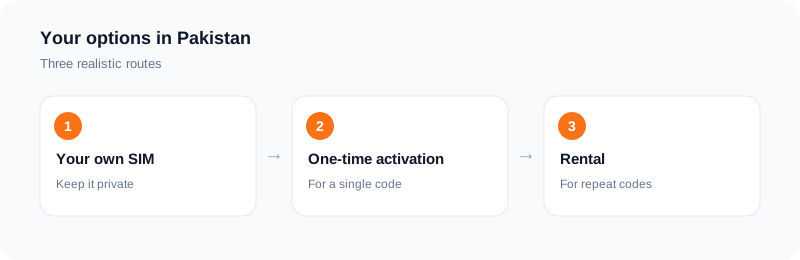
There are three, and the honest answer is that each one fits a different situation.
Option 1: Your personal SIM. Best for accounts you must keep - banking, primary email, your main WhatsApp. The number is yours, recovery works, and the service is least likely to question it.
Option 2: A second personal SIM. Some people keep a second SIM for sign-ups. It works, and the number is a real mobile number. The cost is a second SIM, a second recharge routine, and a second number to keep active. It also means carrying a second line for every account you create with it.
Option 3: A private virtual number. You rent a number online for one verification or for a set period, and the code arrives in a dashboard in your browser. No second SIM, no second phone. The number is private to your order while it is active, and a one-time activation closes after 20 minutes.
None of these is free of trade-offs. A personal SIM costs the most in privacy. A second SIM costs the most in hassle. A virtual number depends on the service accepting it - each app decides which numbers it accepts, and its policy can change. No option carries a guarantee.
How does a private virtual number work?
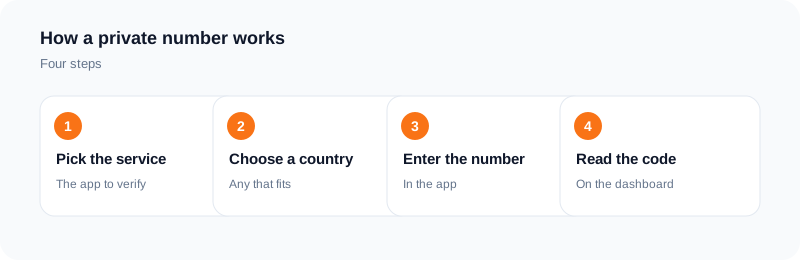
The flow is short. You create an account, top up your wallet, pick the service and the country, and a number is assigned to you. You enter the number in the app, request the code once, and the code appears in your dashboard as soon as it arrives.
Two details matter for users in Pakistan.
Country choice. Pick the country the service expects, or the country whose number format matches the account you are verifying. A number from a different country can still receive the code, but the service may reject it if it checks the number's country.
One-time or rental. A one-time activation stays active for 20 minutes. That covers a single sign-up. If the account will ask for a code again - a new login, a new device, a security check - rent the number for a set period instead. The period is shown in the dashboard before you confirm. Buying a one-time number for an account that asks again later is the most common mistake in this whole process, and by then the number is closed.
Number type still matters here: some services reject VoIP lines, and a non-VoIP number is a mobile number on a carrier network rather than an internet-based line. Acceptance is always decided by each service, not by the provider, and its policy can change.
How do I pay when international cards are awkward?
This is the practical question that stops many people in Pakistan before they start. International card payments do not always work smoothly, and not everyone has a card that pays in dollars online.
SMS Activate takes payment by cryptocurrency through Cryptomus - Bitcoin, USDT, Ethereum, Tron, and other major coins. You top up your wallet, and the payment is credited to your balance automatically once it confirms. The wallet is then charged when you place an order, and the final price is shown in the dashboard before you confirm. Prices are in US dollars and vary by app, country, and current tier.
If you have never paid by crypto before, the steps are: buy the coin on an exchange or app you already use, send it to the wallet address the top-up page shows, and wait for the payment to confirm.
SMSOTPS works the same way at smsotps.com, with the same kind of crypto top-up. Both are our own brands; the payment flow is the same on either one.
What if the code never arrives?
First, wait. Delivery depends on the sending service and the carrier route, so a code can be slow without anything being wrong.
For a one-time activation: if no SMS arrives within the 20-minute window, an eligible order cancels and the charge is refunded to your wallet. You can also cancel an eligible activation yourself after the first 2 minutes if nothing has arrived and the window has not ended.
For a rental: refunds are checked manually, so contact support with the order details.
Do not request the code again and again on the same number. Repeated requests can trigger the app's own rate limits. If the number is rejected, cancel and start a new activation with a different country instead of retrying the same line.
One more honest point: some services are stricter than others about virtual numbers, and some may block them some of the time. If a service rejects virtual numbers entirely, no provider can work around that, and anyone who says otherwise is selling a promise they cannot keep.
Frequently asked questions
Can I verify WhatsApp with a virtual number from Pakistan?
Numbers are available for WhatsApp and the code arrives in the dashboard when it is sent. Whether WhatsApp accepts a specific number is decided by WhatsApp, and its policy can change.
Should I use my personal number or a virtual number for a new account?
Use your personal number for accounts you cannot afford to lose, such as banking and primary email. Use a virtual number for extra accounts, testing, marketplaces, and sign-ups where you do not want your personal number shared.
Is a virtual number legal to use in Pakistan?
Using a virtual number to receive SMS is legal in most countries. What matters is how you use it: each app sets its own terms, and some restrict virtual numbers. Check the terms of the service you are signing up for before you use a separate number.
How long does a one-time activation last?
20 minutes from booking. You can request more than one code for the selected application inside that window. After the window ends, the number closes. If the account will ask for a code again later, rent instead.
Do I need a SIM card or a Pakistani phone plan?
No. The number is hosted for you and the messages arrive in your dashboard in the browser. You do not need a SIM card in your own name or a local plan.
What if I need the same number again next month?
Rent a number for the period shown in the dashboard, and add a recovery method inside the app - a recovery email or a second method - so a later login never depends on a number that has already closed.
Ready to try it?
Open the dashboard to see the price for your service and country before you order.
Open the dashboardKeep reading
Related services
 Telegram verificationCreate a Telegram account without exposing your personal phone number.
 WhatsApp verificationVerify WhatsApp with a private second number instead of your everyday SIM.
 Google / Gmail / YouTube verificationVerify a new Google account, Gmail address, or YouTube channel without your main number.