Effective SMS Verification Guide
Guides · By SMS Activate Team · Draft - not yet published · 8 min read
SMS verification is a simple process with a lot of small steps, and most failures happen in one of those small steps - the wrong kind of number, the wrong country, the code requested too many times, or the number closed before the account asks again. This guide walks the whole process end to end, in order, so you can get it right the first time.
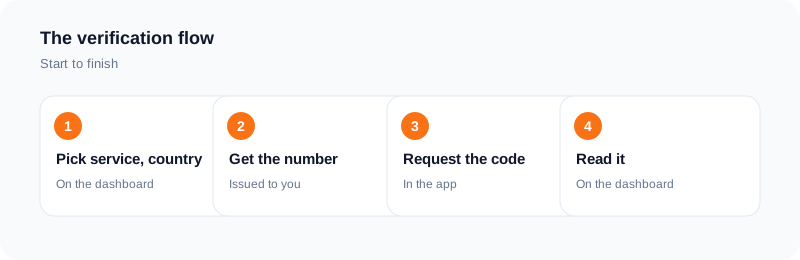
The process in one line: pick the right kind of number, enter it correctly, request the code once, and read it in your dashboard. Everything below is about doing those four things properly.
What is SMS verification?
SMS verification is how a service checks that the phone number you gave it belongs to you. The service sends a one-time code by text message, and you type the code back into the service. If the code matches, the service knows the number is yours - or at least, that you can read the messages sent to it.
It is also called OTP verification. OTP stands for one-time password, and the code is a one-time password: it works once, for that login or sign-up, and then it is useless.
The code is not the account. It is the key to the account. Keep that distinction in mind, because it decides which kind of number you need.
Before you start: two questions that decide everything
Answer these two questions before you pick a number. They decide everything else.
1. What am I verifying? A throwaway account, a social account you will keep, a messaging app, a marketplace, or a bank? The more the account matters, the more the number matters. A throwaway sign-up can use a free public inbox. An account you plan to keep cannot - anyone can read the messages on a shared public number.
2. Will I need the number again? Some accounts ask for a code once and never again. Others ask every time you log in from a new device, or for a security check months later, or for recovery. If the account will ask again, you need a number that will still be there when it asks. If it will not, a one-time number is enough.
Write the answers down. If the account matters and it will ask again, you need a rental. If the account matters and it will not ask again, you need a one-time activation. If the account does not matter at all, a free public inbox will do.
Activation or rental: which one do I need?
One-time activation. You pay for one activation. The number stays active for 20 minutes from booking. Inside that window you can request and receive more than one code for the selected application. If no SMS arrives within the window, an eligible activation is refunded to your wallet. You can also cancel an eligible activation after the first 2 minutes if nothing has arrived and the window has not ended. After the window ends, the number closes.
Use it for: a single sign-up, a single verification, an account that will never ask for a code again.
Rental. You keep the same number for a set period so the account can ask for codes again later. The period is shown in the dashboard before you confirm. Rental refunds are checked manually, so the rules are different from activations.
Use it for: accounts that ask for codes again - logins from a new device, recovery, security checks, banking, email, messaging apps you keep.
The most common mistake in this whole process is buying a one-time number for an account that asks again a week later. By then the number is closed, and the account is locked behind a verification you cannot receive. If you are unsure whether the account will ask again, rent.
How do I pick the service and country?
Pick the service first: the app or website you are verifying. On the dashboard, choose that service from the list. This matters because the price and the number type depend on the service, and the activation is tied to the application you selected.
Then pick the country. The rule is simple: pick the country the service expects, or the country whose number format matches the account. A number from a different country can still receive the code, but the service may reject it if it checks the number's country.
Prices vary by app, country, and current tier. The final price is shown in the dashboard before you confirm, and prices are in US dollars. Check the price before you pay, not after.
How do I enter the number correctly?
This is where most failures happen, and it is the easiest step to get wrong.
Copy the number exactly as shown. Do not retype it from memory. Copy it from the dashboard, paste it into the app, and check the country code matches. A number copied without its country code, or with the country code typed twice, will not receive anything.
Use the number as given, with no edits. Do not add spaces, dashes, or a leading zero in front of the number. Do not change the country code. If the app asks for the number in a specific format, enter it in that format - and if it rejects the format, check the dashboard to confirm the number is exactly as shown.
Enter it once, then request the code once. Requesting the code again and again on the same number does not make it arrive faster. It can trigger the app's own rate limits, and a rate-limited account stops receiving codes entirely. Request once, then wait.
How do I request the code?
In the app, tap the button that sends the code - usually "Send code", "Verify", or "Get code". Then wait.
Delivery depends on the sending service and the carrier route, so a code can be slow without anything being wrong. Give it time. The activation window is 20 minutes, and a code that arrives in the first few minutes is normal.
Do not request the code a second time while the first one is still on its way. If the first code arrives after you requested a second one, the app may only accept the newest code - and you will not know which one is newest. Request once, wait, and only request again if the window is running out and nothing has arrived.
Where do I read the code?
In your dashboard, next to your number. The code appears there as soon as it arrives. You do not need a SIM card, a phone, or a text message app on your own device - the number is hosted for you, and the messages arrive in your account in the browser.
On a private activation, only you can see the code. On a free public inbox, anyone can see it. That is the difference between the two, and it is the reason a public inbox is only fit for throwaway checks.
Read the code from the dashboard and type it into the app. The code works once. After you use it, it is done.
What if nothing arrives?
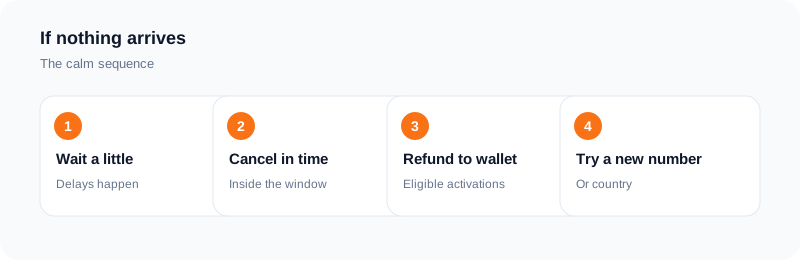
Wait first. Then, if the window is ending and nothing has arrived, cancel the activation instead of requesting the code again in a loop.
For a one-time activation: if no SMS arrives within the 20-minute window, an eligible order cancels and the charge is refunded to your wallet. You can also cancel an eligible activation yourself after the first 2 minutes if nothing has arrived and the window has not ended. After the refund, start a new activation - with a different country if the first one was rejected.
For a rental: refunds are checked manually, so contact support with the order details.
Deep troubleshooting - the full list of reasons a code does not arrive, and what to try for each one - is a separate guide.
Why do some services reject some numbers?
Because each service decides which numbers it accepts, and its policy can change.
The main reasons a number is rejected:
VoIP lines. Some services reject VoIP numbers. A non-VoIP number is a mobile number on a carrier network rather than an internet-based line - but acceptance is still decided by each service, and its policy can change. Shared or public numbers. A number that hundreds of people have used for sign-ups is easy for a service to recognise and block. A private number rented for one order is not shared with anyone else during that order. Country mismatch. A service may only accept numbers from certain countries, or may treat a number from an unexpected country as suspicious. Rate limits. Too many code requests from one number or one account can trigger a block that lasts hours.
No provider can promise a specific service will accept a specific number. Anyone who promises that is selling something they cannot prove. What a provider can promise is the kind of number it sells, the price before you pay, and the refund rule when no SMS arrives. Hold it to those three things.
Frequently asked questions
How long does SMS verification take?
Usually minutes. A one-time activation gives you a 20-minute window, and the code normally arrives inside it. If nothing arrives within the window, the order cancels and an eligible activation is refunded to your wallet.
Can I use the same number for more than one service?
A one-time activation is tied to the application you selected. A rental keeps the same number for a set period, so it can be used for more than one service as long as each service accepts it. Whether a specific service accepts a specific number is decided by that service.
Do I need a SIM card to receive a verification code?
No. The number is hosted for you and the code arrives in your dashboard in the browser. You do not need a SIM card in your own name or a phone plan.
What is the difference between SMS Activate and SMSOTPS?
Both are our own brands for the same kind of service: private temporary numbers for SMS verification. SMS Activate is at smsactivate.uk and SMSOTPS is at smsotps.com. The process in this guide is the same on either one.
Can I verify a bank account with a temporary number?
Some banks block virtual numbers entirely, or only accept numbers from specific countries. Your personal number stays the right choice for banking. A rented number is a useful extra route for other accounts, not a replacement for the bank's own recovery options.
What should I do if I used a one-time number and the account asks for a code again?
The number is closed, so it cannot receive the code. Set up a recovery method inside the account - a recovery email, an authenticator app, or a backup code - before this happens. If the account is already locked, contact the service's own support; a new number cannot recover an account that only accepts codes on the old one.
Ready to try it?
Open the dashboard to see the price for your service and country before you order.
Open the dashboardKeep reading
Related services
 Telegram verificationCreate a Telegram account without exposing your personal phone number.
 WhatsApp verificationVerify WhatsApp with a private second number instead of your everyday SIM.
 Google / Gmail / YouTube verificationVerify a new Google account, Gmail address, or YouTube channel without your main number.